How to Save Images and Videos from Pinterest
Learn how to save Pinterest images and eligible videos with official tools, understand copyright, and organize useful Pins with RTRIV.
How to Save Images and Videos from Pinterest
Pinterest distinguishes three actions: saving a Pin to a board, downloading an available media file and sharing a Pin link to another app. Pinterest’s official image-download guide confirms that some image Pins can be downloaded, while creator settings can allow downloads for certain full-screen video Pins. RTRIV covers a different need: organizing a supported Pin link and its extracted information in a searchable iPhone library.
Method 1: Pinterest's built-in download button (images only)
The simplest path on mobile is Pinterest's built-in download feature. It is available on some image Pins.
- Open the Pinterest app and tap a pin to open the full view.
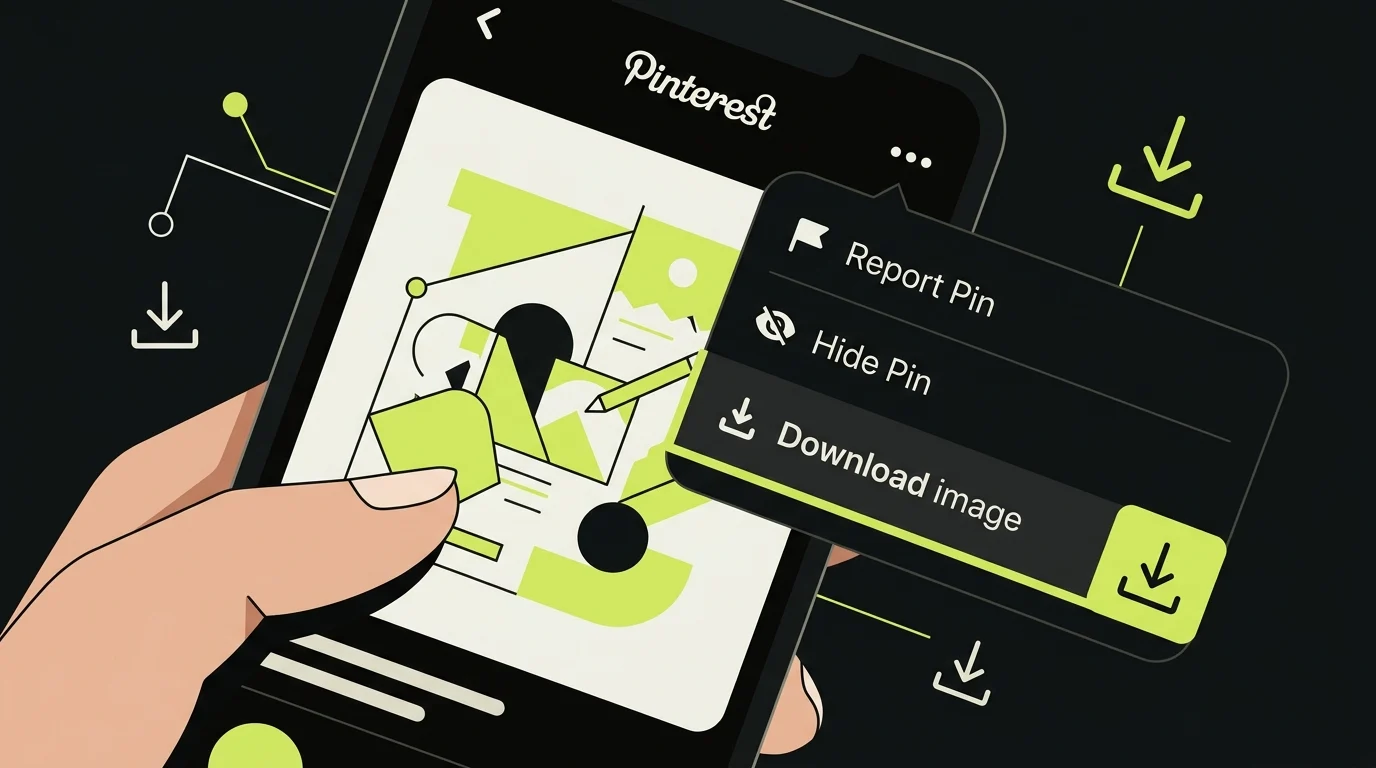
Tap the three-dot icon in the top-right corner of the pin, then select Download image from the menu that appears.
On iPhone, the image saves to Photos.
When the option is missing: Pinterest notes that not every Pin can be downloaded. Check that you are using the current app or browser; otherwise, keep the Pin on a board or save its link rather than using an unsupported workaround.
Resolution note: The resolution you receive can differ from the creator’s original upload. Do not assume that an external service can recover a lossless original simply because it labels a button “HD”.
Method 2: Check whether a video Pin allows downloads
Creators can choose whether people may download their full-screen video Pins. When the option is enabled, Pinterest adds a username watermark. Other formats may not expose a download action.
Open the Pin and inspect its current menu. If no supported download action appears, save the Pin to a board or copy its link for reference. Pinterest’s community guidelines warn against undocumented or unsupported methods used to access, scrape or download the service.
Avoid any downloader that asks for Pinterest credentials, installs a configuration profile or disguises advertisements as download controls. Even without a login, sending a Pin URL to a third party discloses that URL to the service. For someone else’s work, the safer options are Pinterest’s supported controls or permission from the creator.
Method 3: Save the pin link to RTRIV (iPhone)
Downloading a file gives you a static image or video with no context. If the pin was a recipe, a place, a project idea, or a product recommendation, the file alone often is not enough to act on it later. RTRIV is an iPhone app built for exactly this gap.
Workflow:
- Open the Pinterest app and find the pin you want to keep.
- Tap Share → tap the iOS share sheet → select RTRIV.
- RTRIV saves the pin link and can extract structured information—a title and summary—depending on what the source page exposes.
- The pin appears in your RTRIV library, searchable by keyword, and can be organized into collections.
Because RTRIV centralizes saved content in a searchable library and collections, you can search across everything you have saved—not just Pinterest pins—and surface it when you are ready to cook that recipe, visit that place, or start that project. For the wider workflow across platforms, see how to save content from social media. Saved content in RTRIV can support concrete actions such as following recipe steps or revisiting a place, project, or recommendation, which is the difference between a file that sits in your Photos app and an item you actually return to.
When to use which method
Goal Best path Save an image file to Photos Built-in Pinterest download button Save an eligible full-screen video Pin Pinterest’s creator-enabled download action Keep an original-resolution asset Request the original from its creator Organize and act on saved pins later RTRIV via iOS share sheet
Copyright: what the download button does not settle
Being able to download something is not the same as having the right to use it. Pinterest images are not automatically copyright-free. Pinterest is a discovery and bookmarking platform, and most images on Pinterest are owned by someone else. Pinterest itself states that you should seek permission from the copyright holder when needed, and that Pinterest generally cannot tell you who owns a given pin.
Pinterest's Terms of Service say that users who upload content grant Pinterest and other users a license to use and display that content in connection with the service—enabling features like saving, showing, and sharing on Pinterest. It does not give you a blanket license to download and republish that content elsewhere.
Copyright exceptions vary by jurisdiction and context. Do not treat private use, credit or the presence of a download button as automatic permission to reproduce or republish a work.
There are only a few situations where using an image found on Pinterest may be clearly allowed: the original creator states the image is free to use, the image is released under a specific license such as Creative Commons, the image is in the public domain, or you have written permission from the copyright holder.
Key takeaways
- Pinterest's built-in Download image button works for some image Pins and saves to your device; Pinterest notes that not every Pin can be downloaded.
- Some full-screen video Pins can be downloaded when the creator enables the option; other Pins may offer no supported download action.
- A download does not transfer copyright or guarantee permission to reuse the work.
- RTRIV accepts supported Pin links through the iOS share sheet and can organize extracted information in a searchable library; it does not promise to download every Pin or permanently preserve its media.
Verified sources
Frequently Asked Questions
About
Équipe RTRIV
We design RTRIV to turn saved content into decisions, projects and moments that are actually lived.