Clearspace App Review: Is It Worth It in 2026?
Evaluating the Clearspace app for iPhone? This review covers features, limits, and better alternatives to break the scrolling habit for good.
Clearspace App Reviewed: Features, Limits, and Smarter Alternatives
Here's everything you need to evaluate the Clearspace app honestly — what it does well, where it falls short, and which tools (including a genuinely different option) might serve you better.
On This Page
- What the Clearspace app actually does
- Clearspace iPhone experience: what users say
- Where Clearspace falls short
- Clearspace alternatives worth considering
- Rtriv: a fundamentally different approach to mindless scrolling
- Which tool should you actually use?
- Key Takeaways
- Frequently Asked Questions
What the Clearspace app actually does
The Clearspace app belongs to a growing category of tools sometimes called mindful app launchers — software designed to interrupt the automatic, unconscious gesture of opening a social media app before your brain has had any say in the matter. If you've ever unlocked your phone to check the time and found yourself on Instagram three minutes later, you understand exactly the problem Clearspace is trying to solve.
Because features and prices change, the current Clearspace App Store listing should be treated as the source of truth for device compatibility, in-app purchases and the latest version.
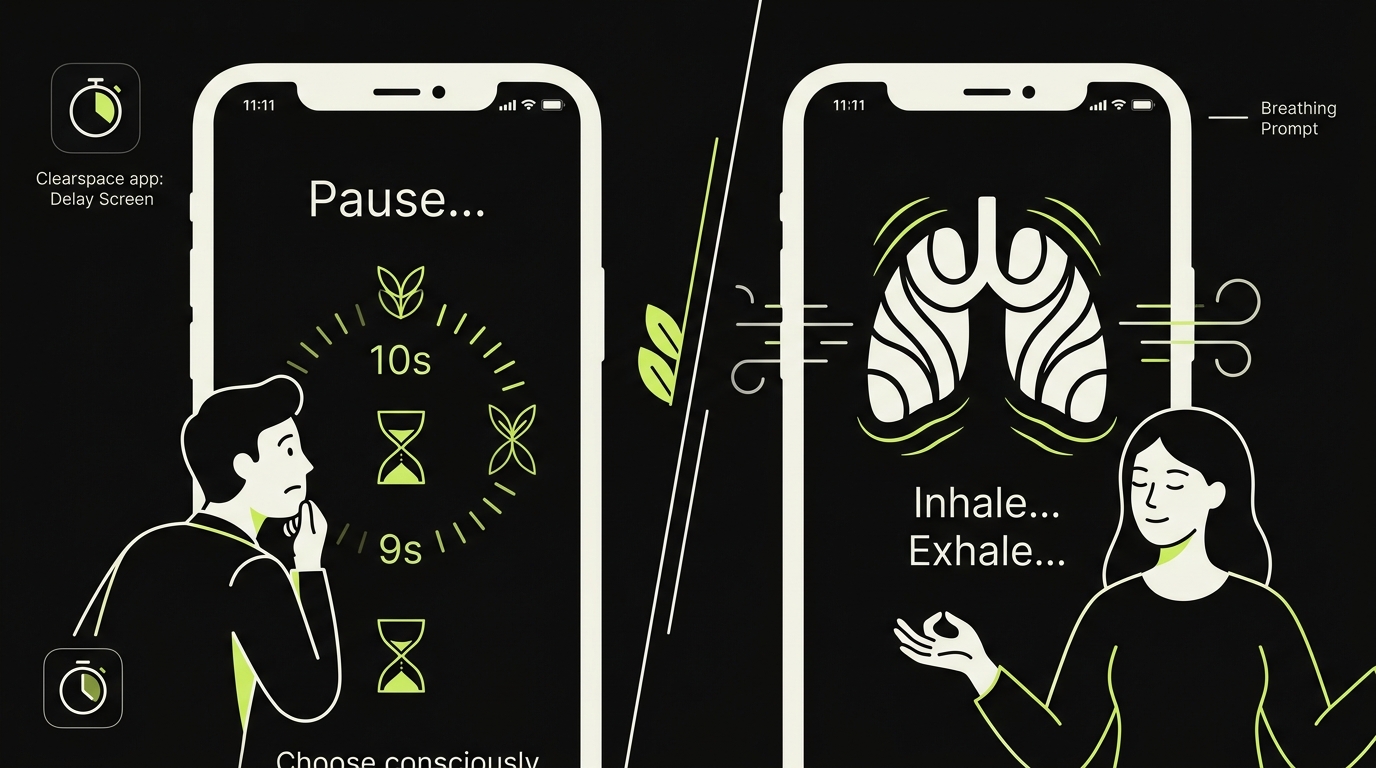
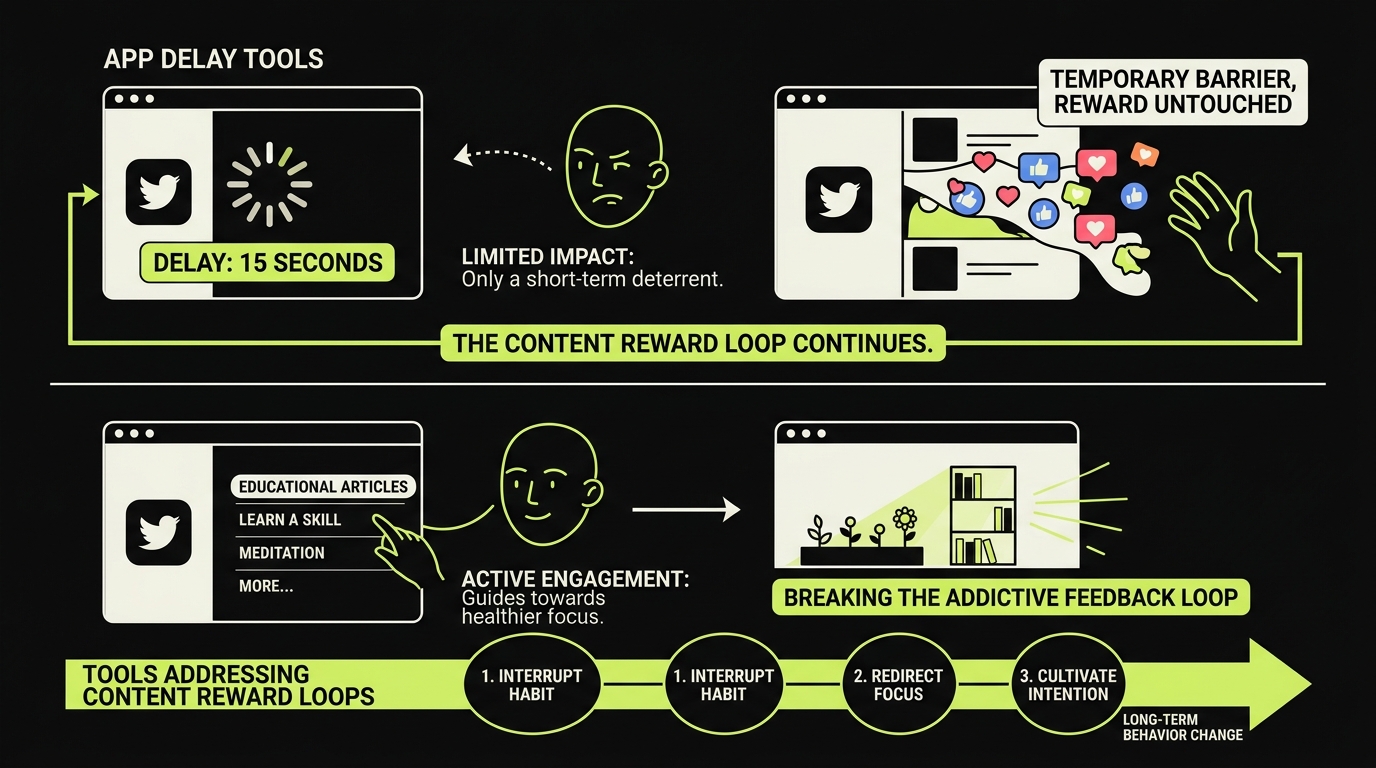
The core mechanic is what's often called an app delay tool: when you tap on a blocked app like TikTok, Twitter, or YouTube, Clearspace intercepts the launch and makes you complete a short task first. This could be a breathing exercise, a brief intention prompt ("Why are you opening this app?"), or simply a timed pause. The friction is intentional — it's designed to snap you out of autopilot.
The behavioral logic is straightforward: the delay makes an otherwise automatic opening visible long enough for the user to reconsider it. Whether that intervention changes total use depends on the person, the apps selected and what happens after access is granted.
The app also tracks your "intercepts," giving you a count of how many times the delay actually stopped you from opening an app. It's a small but effective piece of positive reinforcement.
Clearspace iPhone experience: what users say
The Clearspace iPhone experience is generally polished. The onboarding is smooth, the UI is minimal, and the delay mechanic kicks in quickly after setup. Most users report that the first week feels almost revelatory — suddenly you're aware of how many times a day you reach for your phone out of pure reflex.
App Store reviews frequently highlight the breathing exercise feature as particularly effective. Having to inhale and exhale before opening Instagram creates just enough cognitive distance to ask yourself whether you actually want to be there.
That said, the Clearspace screen blocker experience is meaningfully different from a hard blocker like Opal. It doesn't prevent access — it just slows it down. For some people, that's the ideal approach. For others, it's easy enough to tap through the delay when the urge is strong enough. The friction works best when you're mildly tempted, less so when you're in a full-on craving state.
The subscription pricing — around $9.99/month or $49.99/year as of early 2026 — is a sticking point for many users. The free tier exists but is limited enough that it's hard to properly evaluate the app without paying.
Where Clearspace falls short
Clearspace does one thing well: it interrupts the launch gesture. But phone addiction is rarely just about the launch gesture.
Clearspace primarily targets the moment of entry. That is useful when opening an app is the main problem, but it may be insufficient when sessions themselves run long. Check the current product settings to see whether session limits or follow-up prompts cover your specific use case.
This is a structural gap. The tool treats phone addiction as a door problem — if we make the door harder to open, we'll use the room less. But for many users, the real problem is what happens inside the room.
There's also a habituation issue. Several users in Reddit threads and App Store reviews note that after two to three months, the delay stops feeling like friction. Your brain adapts. The breathing exercise becomes a mechanical step rather than a genuine pause. This is a well-documented phenomenon in behavioral psychology: what starts as a disruptor eventually becomes part of the routine.
Finally, Clearspace doesn't address the underlying reason people scroll. Boredom, anxiety, FOMO — these don't disappear because you added five seconds before opening TikTok.
Clearspace alternatives worth considering
If you're actively evaluating tools, it's worth understanding the landscape before committing. If you want a broader comparison, our guide to the apps to replace doomscrolling covers the full field.
One Sec
One Sec is probably the closest direct competitor to Clearspace. It works as a mindful app launcher in a similar way — intercept, pause, breathe — but its interface is arguably more customizable. You can set different friction levels per app, which is useful if you want lighter resistance on, say, your email app and heavier friction on TikTok. Read our full One Sec app review: does it actually work? for a deeper breakdown.
Opal
Opal takes a harder line. Rather than a delay, it blocks apps entirely during sessions you define. There's no breathing through the gate — the app simply won't open. This approach may suit people who find a delay insufficient. The trade-off is flexibility; if you genuinely need to check something quickly, Opal can feel punishing. For a comparison of Opal and its competitors, see our piece on Opal alternatives.
Screen Time (native iOS)
Apple's built-in Screen Time is free and surprisingly capable, but it's easy to override — especially for adults who set their own passcodes. It works better as a monitoring tool than a true friction mechanic.
Apple's official Screen Time guide explains how app limits and scheduled downtime behave, including when a limit can be ignored or a block enforced.
Rtriv: a fundamentally different approach to mindless scrolling
Here's the angle most comparison articles miss: all of the tools above — Clearspace, One Sec, Opal — are reactive. They respond to the moment you try to open an app. They treat the symptom.
Rtriv works differently. It's built on a different model of why you scroll in the first place.
Most mindless scrolling isn't really about wanting to scroll — it's about wanting to find something worth keeping. A recipe. An idea. A video you'll actually watch later. The problem is that social media apps are engineered to make saving feel inconvenient while making continued scrolling feel frictionless. So you keep going, hoping the next post will be worth your time.
Rtriv flips this dynamic. It gives you a fast, frictionless way to save content from any social platform — Reels, TikToks, tweets, YouTube clips — into a clean, organized personal library. And crucially, it adds intentional friction not at the door, but at the point of continued, purposeless scrolling. When you've saved what you came for, Rtriv nudges you to leave.
This isn't a Clearspace screen blocker replacing another Clearspace screen blocker. It's a different theory of change: give the scroll a purpose, reduce the reward of staying when the purpose is gone.
For people who find that delay tools stop working after a few weeks (and many do), Rtriv offers something more durable — not because it's stricter, but because it addresses the content reward loop directly, not just the launch behavior.
Which tool should you actually use?
The honest answer depends on what kind of scroller you are.
If your problem is impulse opening — you tap apps without thinking, before you even know what you want — Clearspace or One Sec are solid starting points. The app delay tool mechanic is well-suited to building awareness in the early stages of changing a habit.
If your problem is time lost inside apps — you open intentionally but can't stop once you're in — Opal's hard block approach may serve you better. You can also explore other options in our apps to replace doomscrolling roundup.
If your problem is purposeless scrolling — you scroll because there's always something that might be interesting, but you rarely find it and never save it — then Rtriv addresses something the others don't. It transforms the scroll from an open-ended dopamine hunt into a bounded, intentional action.
Most people benefit from combining approaches. Use a delay tool to interrupt impulse opens. Use Rtriv to make the time you do spend on social media feel purposeful and finite. These aren't competing solutions — they solve different parts of the same problem.
Related reading :
- Best Content Curation Tools in 2026 (Honest Picks)
- Best Bookmark Manager Apps for iPhone 2026
- Jomo App Review 2026: Is It Worth It?
Key Takeaways
- The Clearspace app is a well-designed mindful app launcher that adds intentional friction before opening social media apps — effective for building awareness, less effective once your brain habituates to the delay.
- Clearspace addresses the launch behavior but not what happens inside apps — users who scroll heavily once they're in may find it insufficient on its own.
- Alternatives like One Sec offer similar delay mechanics with more customization; Opal offers hard blocking for less flexible guardrails.
- Rtriv takes a structurally different approach — reducing the urge to scroll by giving content a meaningful destination, and adding friction at the point of purposeless browsing rather than at app launch.
- Combining a delay tool for impulse control with a save-first tool like Rtriv targets both the entry behavior and the content reward loop that keeps you inside feeds.
Frequently Asked Questions
About
Équipe RTRIV
We design RTRIV to turn saved content into decisions, projects and moments that are actually lived.